This article is the Day 22 entry for TeX & LaTeX Advent Calendar 2023. Day 21 was by ujimushi at SradJP. Day 23 is by wtsnjp.
Purpose
In educational institutions such as cram schools and regular schools, there are many situations where multiple-choice questions from exams like the Common Test need to be graded. Given that these are multiple-choice questions rather than written-response questions, manually grading them by sight and summing up scores is inefficient, and considering accuracy, automation is preferable. Since grading time is also significantly reduced, students benefit from faster score returns as well — truly embodying this year's theme, "How to find happiness with (La)TeX." By packaging the entire workflow — including mark sheet reading and PDF merging, operations beyond TeX — into a distributable application (planned to be implemented as a macOS application in Swift), everyone, including instructors who are not familiar with TeX, can benefit.
(Update: Implementation completed on 2024/1/31)
What We Want to Build
As a real-world example, consider administering the 1988 National Center Test for University Admissions (trial) English exam and distributing graded answer sheets like the following through automated grading.
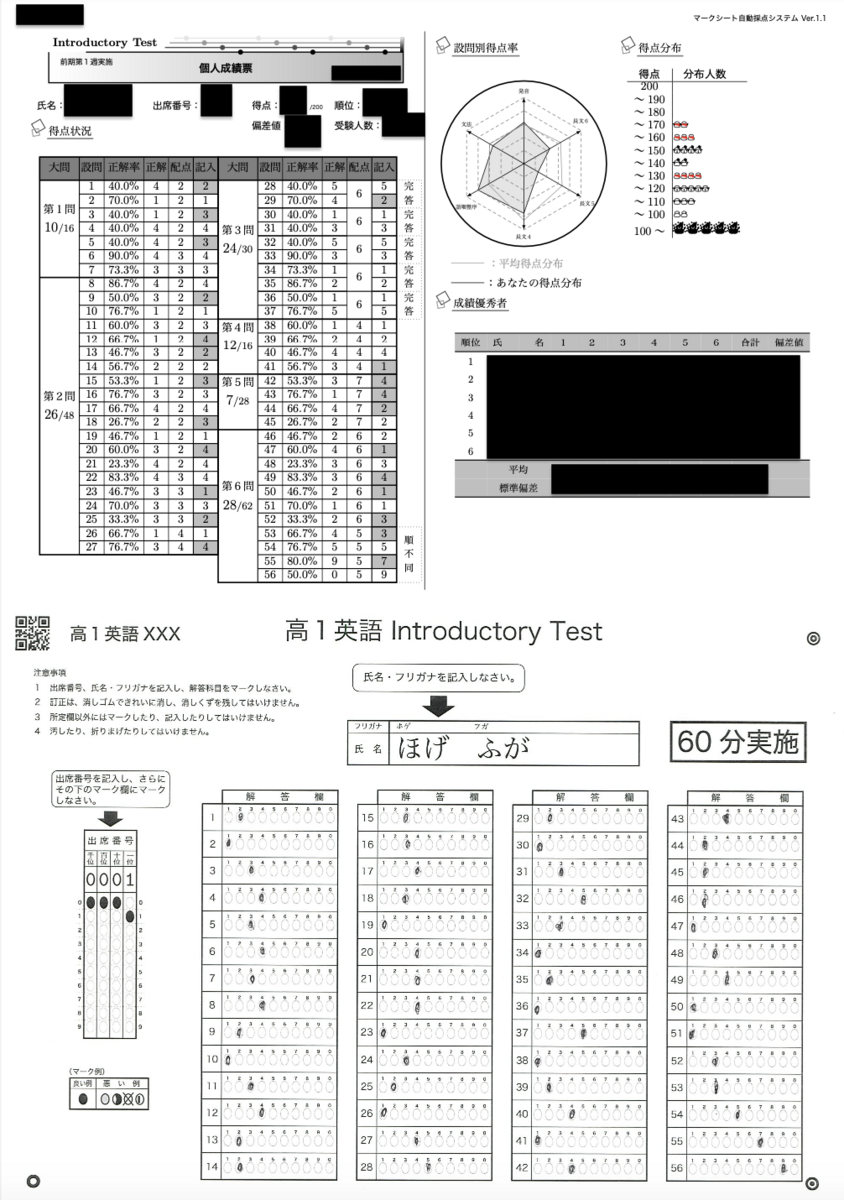
Workflow
- Creating individualized mark sheet answer forms
- Reading mark sheets
- Automated grading with TeX
- Aggregating grading data
- Merging with original mark sheet answer forms and printing
The overall workflow is as described above, but explaining everything would make this article far too long, so this article will primarily focus on the automated grading with TeX portion.
Creating Individualized Mark Sheet Answer Forms
To create answer sheets that differ only in examinee number and name from a "template" mark sheet, the following articles by doraTeX are helpful.
https://doratex.hatenablog.jp/entry/20201205/1607102432
https://doratex.hatenablog.jp/entry/20180727/1532699454
Reading Mark Sheets
An in-house mark sheet reader (not publicly available) is used to read the mark sheets.
Automated Grading with TeX
There are three types of question formats in the Common Test multiple-choice questions.
- Single-answer questions: The simplest question format. One choice is selected per question.
- Complete-answer questions: Points are awarded only when all questions in a set (always two in the actual exam) are answered correctly.
- Order-independent questions: Points are awarded based on how much the set of consecutive answer choices matches the correct answer set.
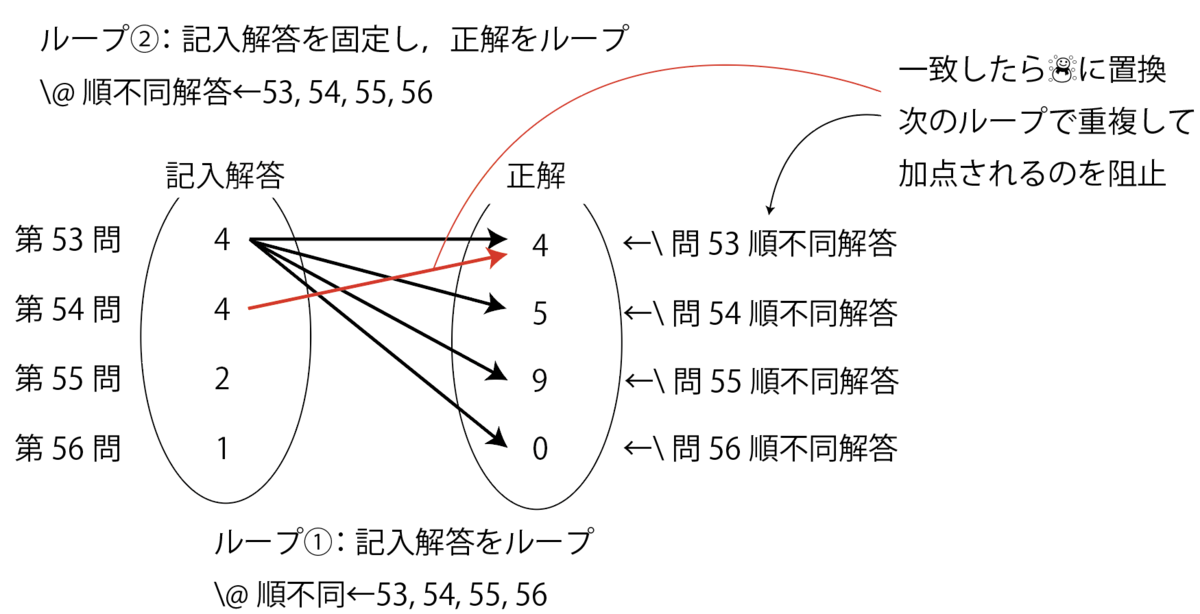
For example, if the correct choices for question numbers 53–56 are 4, 5, 9, 0, then answers of 0, 5, 9, 4 or 9, 0, 5, 4 receive full marks, answers like 9, 0, 1, 2 receive points for 2 questions, and answers like 4, 4, 4, 4 naturally receive points for only 1 question.
Registering Model Answers
First, register the model answers in ModelAnswers.tex (model answers file).
% Register as \RegisterModelAnswer{question number}{correct choice}{points}

\RegisterModelAnswer{1}{2}{6}%
\RegisterModelAnswer{2}{1}{2}%
...
\RegisterModelAnswer{55}{9}{5}%
\RegisterModelAnswer{56}{0}{5}%

% Among those registered above, register complete-answer question sets as:
% \RegisterCompleteAnswer{question1, question2, question3, ...}
\RegisterCompleteAnswer{28,29}
...
\RegisterCompleteAnswer{36,37}

% Similarly, register order-independent question sets as:
% \RegisterOrderIndependent{question1, question2, question3, ...}
\RegisterOrderIndependent{53,54,55,56}
As preparation, we define \e@namedef, the fully-expanded version of \@namedef, as follows.
\def\e@namedef#1{\expandafter\edef\csname#1\endcsname}

% Replaces \def with \edef in the definition of \@namedef from latex.ltx
%\def\@namedef#1{\expandafter\def\csname #1\endcsname
% Definition of \RegisterModelAnswer (register model answer)
\def\RegisterModelAnswer#1#2#3{%
\e@namedef{Q#1Answer}{#2}%
\e@namedef{Q#1Points}{#3}%
\e@namedef{Q#1OrdIndepAnswer}{#2}
% The above is only used for order-independent questions, but defined for all questions for simplicity
}
Next, let's examine the definition of \RegisterCompleteAnswer (register complete-answer questions). Internally, it creates a reverse lookup from each question contained in the complete-answer set (hereafter, "complete-answer set") back to the set itself.
For example, executing
\RegisterCompleteAnswer{28,29}
internally runs
\e@namedef{CompleteSet28}{28,29}
and
\e@namedef{CompleteSet29}{28,29}.
%%% Complete-answer questions
\newcounter{RequiredCorrectCount}%
\def\RegisterCompleteAnswer#1{%
\setcounter{RequiredCorrectCount}{0}%
% Loop over each element of the array
\expandafter\@for\expandafter\@CompleteQ\expandafter:\expandafter=#1\do{%%
\e@namedef{CompleteSet\@CompleteQ}{#1}%
\stepcounter{RequiredCorrectCount}%
\ifnum\arabic{RequiredCorrectCount}=\@ne
\else
\e@namedef{Q\@CompleteQ Points}{0}
% Override points to 0 for all questions in the set except the first
\fi
}%%loop
\e@namedef{#1CompleteAnswerCount}{\arabic{RequiredCorrectCount}}%
}
Next, we move to the definition of order-independent questions. Here, we create a mapping from questions belonging to the order-independent set to the correct answer choice group. For example,
\RegisterOrderIndependent{53,54,55,56}
→\e@namedef{OrdIndepSet53}{53,54,55,56}
\e@namedef{OrdIndepSet54}{53,54,55,56}
\e@namedef{OrdIndepSet55}{53,54,55,56}
\e@namedef{OrdIndepSet56}{53,54,55,56}
\e@namedef{CorrectSet53,54,55,56}{4,5,9,0}
\e@namedef{Q56MappingToCorrectSet}{\CorrectSet53,54,55,56}
expands as shown above. Note that \Q○○MappingToCorrectSet (mapping from question XX to the correct answer set) is generated only for the question with the largest question number within the set. This is to defer grading until the last question in the set is reached.
%%% Order-independent questions
\newcounter{QuestionsInOrdIndepSet}%
\def\RegisterOrderIndependent#1{%
\@tempcnta =\z@
\setcounter{QuestionsInOrdIndepSet}{0}%

% Loop over each element of the array
\@for\@OrdIndepQ:=#1\do{%%
\e@namedef{OrdIndepSet\@OrdIndepQ}{#1}%
\stepcounter{QuestionsInOrdIndepSet}%
%%% Create reverse lookup to the correct answer set
\@ifundefined{CorrectSet#1}{%if undefined
\e@namedef{CorrectSet#1}{\@nameuse{Q\@OrdIndepQ Answer}}%
}{%if already defined
\e@namedef{CorrectSet#1}{\@nameuse{CorrectSet#1},\@nameuse{Q\@OrdIndepQ Answer}}
}
\e@namedef{\@OrdIndepQ QuestionCount}{\arabic{QuestionsInOrdIndepSet}}%
}%end of loop
\@for\@OrdIndepQ:=#1\do{%%
\advance\@tempcnta by\@ne
\ifnum\value{QuestionsInOrdIndepSet}=\@tempcnta
% Generate only for the last question in the set
\e@namedef{Q\@@OrdIndepQ MappingToCorrectSet}{\csname CorrectSet#1\endcsname}
\fi
}
}
The Grading Section
Next, we explain the implementation of the grading section. First, we register the results read from the mark sheet.
\def\ScanResult#1#2{%
\setcounter{QuestionNumber}{0}%
\setcounter{StudentID}{#1}%
\stepcounter{StudentCount}%
% Register the written answers for each student
\@for\@StudentAns:=#2\do
\stepcounter{QuestionNumber}%
\e@namedef{\arabic{StudentID}EnteredValue\arabic{QuestionNumber}}{%
\ifx\@StudentAns\@empty -\else\@StudentAns\fi}
% Replace blank entries with -
}%end of loop
\setcounter{TotalQuestions}{\arabic{QuestionNumber}}%
}
Single-Answer Questions
This is straightforward. We check the entered value against the answer digit, and award points only when these two values are equal. A correct/incorrect flag is also prepared for calculating the accuracy rate.
\ifnum\@nameuse{\arabic{StudentID}EnteredValue\arabic{k}}=\@nameuse{Q\arabic{k}Answer}\relax%when correct
\e@namedef{\arabic{StudentID}Q\arabic{k}Correctness}{1}%correct/incorrect flag
\e@namedef{\arabic{StudentID}Q\arabic{k}Points}{\@nameuse{Q\arabic{k}Points}}%award points
\advance \@tempcnta by \@nameuse{Q\arabic{k}Points}%calculate total score
\else%incorrect
\e@namedef{\arabic{StudentID}Q\arabic{k}Correctness}{0}%set flag to 0
\e@namedef{\arabic{StudentID}Q\arabic{k}Points}{0}%do not award points
\fi
Complete-Answer Questions
This is more complex than single-answer questions, but still manageable. Using k as the index holding the current question number, \@ifundefined{CompleteSet\arabic{k}}{non-complete-answer processing}{complete-answer processing} causes complete-answer processing to be performed when the set is defined.
The idea is to loop over \CompleteSet (complete-answer set) prepared in ModelAnswers.tex, and award points only when the number of elements in the set (i.e., the number of questions that must all be answered correctly for points to be awarded) matches the number of correctly answered questions.
\@tempcnta = \z@%counter for number of complete-answer questions
\@tempcntb = \z@%counter for number of correct answers
\expandafter\@for\expandafter\@CompleteQ\expandafter:\expandafter=\csname CompleteSet\arabic{k}\endcsname\do{
% where k is the index holding the current question number
%when the entry is -
\expandafter\expandafter\expandafter\ifx\csname\arabic{StudentID}EnteredValue\@CompleteQ\endcsname-\relax
\e@namedef{\arabic{StudentID}Q\arabic{k}Correctness}{0}%set flag to 0
\e@namedef{\arabic{StudentID}Q\arabic{k}Points}{0}%do not award points
\else%when the entry is not -
\advance \@tempcnta by \@ne
\ifnum\csname\arabic{StudentID}EnteredValue\@CompleteQ\endcsname=\@nameuse{Q\@CompleteQ Answer}\relax%when correct
\e@namedef{\arabic{StudentID}Q\@CompleteQ Correctness}{1}%correct/incorrect flag
\advance \@tempcntab by \@ne
\else%when incorrect
\e@namedef{\arabic{StudentID}Q\@CompleteQ Correctness}{0}%correct/incorrect flag
\fi
\fi%end of - check branching
}%end of complete-answer question loop
\ifnum\@tempcnta=\@tempcntb\relax
\e@namedef{\arabic{StudentID}Q\arabic{k}Points}{\@nameuse{Q\arabic{k}Points}}
% Award points only when all questions are answered correctly
\fi
Order-Independent Questions
Next, we handle the most challenging order-independent questions. The approach is to loop over each order-independent question and compare it with the answers. Therefore, the computational complexity is on the order of n2. The key point is replacing answers with ☃ (snowman) when a correct match is found. This prevents duplicate scoring for the same answer.
\@ifundefined{Q\arabic{k}MappingToCorrectSet}{\relax}{
% Process only for the last question in the order-independent set
\@tempcntb = \z@%%QuestionsInOrdIndepSet / number of questions in the set
\expandafter\@for\expandafter\@OrdIndep\expandafter:\expandafter=\csname OrdIndepSet\arabic{k}\endcsname\do{%loop 1 start
\expandafter\expandafter\expandafter\ifx\csname\arabic{StudentID}EnteredValue\@OrdIndep\endcsname-\relax
% First, handle the case where the entry is -
\e@namedef{\arabic{StudentID}Q\@OrdIndep Correctness}{0}%set flag to 0
\e@namedef{\arabic{StudentID}Q\@OrdIndep Points}{0}%do not award points
\else%processing when entry is not -
\expandafter\@for\expandafter\@OrdIndepAnswer\expandafter:\expandafter=\csname OrdIndepSet\arabic{k}\endcsname\do{%loop 2 start
\expandafter\expandafter\expandafter\ifx\csname\arabic{StudentID}Q\@OrdIndep Correctness\endcsname1\relax \else %do nothing if already correct
\expandafter\expandafter\expandafter\ifx\expandafter\csname\expandafter\arabic\expandafter{\expandafter S\expandafter t\expandafter u\expandafter d\expandafter e\expandafter n\expandafter t\expandafter I\expandafter D\expandafter}\expandafter E\expandafter n\expandafter t\expandafter e\expandafter r\expandafter e\expandafter d\expandafter V\expandafter a\expandafter l\expandafter u\expandafter e\expandafter\@OrdIndep\expandafter\endcsname\csname Q\@OrdIndepAnswer OrdIndepAnswer\endcsname\relax%when correct
\e@namedef{Q\@OrdIndepAnswer OrdIndepAnswer}{☃}
% Replace answer with ☃ on correct match to prevent duplicate hits (prevents giving full marks for 4,4,4,4 when correct answers are 4,5,9,0)
% For improved readability, you could also use \expandafter\patchcmd... (assuming the order-independent answer set consists of distinct single-digit numbers)
\advance \@tempcnta by \@nameuse{Q\@OrdIndep Points}%calculate total score
\e@namedef{\arabic{StudentID}Q\@OrdIndep Correctness}{1}%correct/incorrect flag
\advance \@tempcntb by \@ne
\e@namedef{\arabic{StudentID}Q\@OrdIndep CorrectCount}{\the\@tempcntb}
\else%when incorrect
\e@namedef{\arabic{StudentID}Q\@OrdIndep Correctness}{0}%correct/incorrect flag
\fi
\fi%do nothing if already correct
}%loop 2 end
\fi%end of - check branching
}%loop 1 end
%reset answers
\expandafter\@for\expandafter\@@OrdIndepAnswer\expandafter:\expandafter=\csname OrdIndepSet\arabic{k}\endcsname\do{%
\e@namedef{Q\@@OrdIndepAnswer OrdIndepAnswer}{\@nameuse{Q\@@OrdIndepAnswer Answer}}
% To preserve the original answers, a separate copy for order-independent use is prepared, and this copy is replaced with ☃
}%
}%
Aggregating Grading Data
The \AggregateData (data aggregation) command computes mean scores, standard deviations, rankings, and deviation values, as well as aggregating grading data including per-question accuracy rate radar charts, score distributions, and top-performing students. The specific implementation is omitted here, but for reference on creating radar charts, here is an article by doraTeX.
https://doratex.hatenablog.jp/entry/20160712/1468291893
The Main TeX File
\begin{document}
\def\TopRankLimit{6}%how many top performers to list

% First argument: student ID, second argument: comma-separated array of mark sheet reader results
\ScanResult{1}{2,1,3,4,3,4,3,4,2,1,3,4,2,2,3,3,4,3,1,4,4,4,1,3,2,1,4,5,2,1,3,5,3,1,2,1,5,1,2,4,1,4,4,2,2,2,1,3,4,1,1,3,3,5,7,9}

%execute grading
\GradeQuestion{1}
...
\GradeQuestion{40}

%aggregate grading data (mean, deviation values, etc.)
\AggregateData

%output individual report cards
\IndividualReport{1} %output report for student ID 1
...
\IndividualReport{40}%
\end{document}